
Star Trek Outposts Unknown Patch Notes: 1.0.2 Fixes
Star Trek Outposts Unknown patch notes cover Update 1.0.2, crew transport fixes, clearer exploration markers, and launch changes. See what to check next.
Jump to
Latest verified facts — Checked October 22, 2026 against the official store listings: Steam
- Star Trek Outposts Unknown was released on October 20, 2026.
- Platforms: Steam, Windows.
What Changed in Update 1.0.2?
Stalled deliveries and stranded passenger vehicles are the changes to watch in the Star Trek Outposts Unknown patch notes for Update 1.0.2. Released on October 22, 2026, this update addresses logistics problems, improves interface access, and adds crash fixes that matter when you’re managing a busy outpost. These Star Trek Outposts Unknown patch notes also build on Update 1.0.1, which tackled missing exploration workers, resource collection problems, and several building issues.
Update 1.0.2 is the latest update covered here for the Windows game on Steam. Its focus is practical: keeping crew transportation working, making important controls easier to use, and cleaning up exploration markers.
| Version | Release date | Main changes |
|---|---|---|
| Launch | October 20, 2026 | Outpost construction, crew management, and exploration in the X’Lehari System |
| Update 1.0.1 | October 21, 2026 | Resource collection, passenger vehicle behavior, exploration assignments, and building fixes |
| Update 1.0.2 | October 22, 2026 | Additional transport fixes, interface improvements, exploration markers, and stability work |
For returning players, the distinction between the two patches matters. Update 1.0.1 addressed passengers abandoning vehicles for other tasks. Update 1.0.2 specifically changes what happens when a crew member’s job finishes while they are still riding: they now travel home instead of stepping out for another assignment and leaving the vehicle at the stop.
Read the Star Trek Outposts Unknown patch notes with your stalled tasks in mind. Check the affected delivery route, crew assignment, or interface control directly, so you can see how the relevant change applies to your outpost.
The update also includes animation polish and visual adjustments. Those changes make the settlement easier to read, while the transport and resource fixes address problems that interrupt its operation.
Crew Transport and Resource Delivery Fixes
Logistics sit at the center of Star Trek: Outposts Unknown. You’re coordinating crew assignments and resource movement across facilities, so a vehicle stopping unexpectedly can interrupt more than the trip itself.
The Star Trek Outposts Unknown patch notes address several specific transport failures across the two updates:
| Affected system | Version | What changed |
|---|---|---|
| Medical Facility deliveries | 1.0.2 | Addresses vehicles getting stuck while delivering resources |
| Passenger trips after a job ends | 1.0.2 | Crew ride home instead of leaving the vehicle at a stop for other work |
| Passengers leaving for other tasks | 1.0.1 | Fixes behavior that could strand passenger vehicles |
| Resupply resource collection | 1.0.1 | Crew no longer need a navigation mesh update before collecting dropped resources |
| Cargo Landing Pad and Planetary Kitchen | 1.0.1 | Addresses crew getting stuck while moving resources between these buildings |
| Resupply placement | 1.0.1 | Fixes an exception triggered by beaming a resupply onto a resource crate |
Start with the Medical Facility if that was where deliveries stopped. Follow the vehicle through its delivery, then check the passenger behavior separately. These are related logistics improvements, but they address different situations.
For passenger transport, watch a crew member whose job ends during the journey. The updated behavior keeps that person aboard for the ride home. That is the specific case to revisit if you previously found a vehicle abandoned at a stop.
Resupply collection received its fix in 1.0.1. Crew previously could leave dropped resources untouched until the navigation mesh changed. When checking your supply flow, distinguish resources waiting at a Resupply drop from resources already moving between buildings.
Try this focused checklist:
- Check resource deliveries to the Medical Facility.
- Watch passenger vehicles when an onboard crew member’s job finishes.
- Inspect collection from Resupply drops.
- Revisit deliveries between the Cargo Landing Pad and Planetary Kitchen.
Keep those checks tied to the affected systems. A successful Medical Facility delivery tells you about that route; passenger behavior needs its own check.
Interface Changes That Make Management Easier
Several changes target controls that were awkward to reach or difficult to read. In a management game with over 55 unique resources, access to resource information matters whenever you’re sorting out an assignment or delivery problem.
The Star Trek Outposts Unknown patch notes include fixes for overlapping menus, unresponsive selections, and interface elements that were difficult to distinguish from the environment.
| Interface element | Version | Change |
|---|---|---|
| Resource dropdown | 1.0.2 | Remains accessible with Crew Overview open |
| Prioritize button | 1.0.2 | Easier to click |
| Transfer menu | 1.0.2 | The final item can now be selected |
| Network placement display | 1.0.2 | More visible against grass |
| Language selection menu | 1.0.2 | Exit button now functions |
| Tech Tree | 1.0.1 | Opens faster |
| Bug reporting | 1.0.1 | F9 works from the main menu |
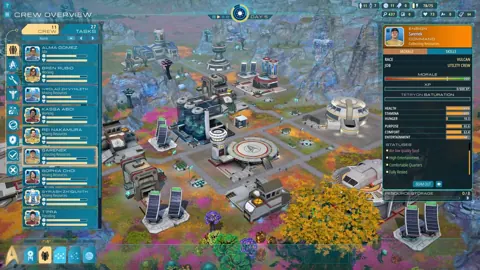
The Crew Overview change is especially relevant when you’re comparing personnel activity with available resources. Open the resource dropdown while Crew Overview is visible to check the corrected interaction. The fix concerns access to the control, rather than a change to resource production or consumption.
The transfer menu correction is similarly specific. If an item at the bottom of the menu previously resisted selection, revisit that entry. The update addresses the last item being unclickable.
Use the improved network placement visibility when laying out connections through grassy terrain. The display now stands out more clearly, helping you inspect placement without relying on a faint interface against the ground.
Other interface work adjusts elements so their contents fit more cleanly. Text formatting has also been corrected in several areas, and missing translations have been added across all languages.
If you encounter another issue, F9 now opens bug reporting from the main menu, following its 1.0.1 fix. Describe the affected building, menu, or assignment precisely when reporting a problem. For transport issues, include whether the interruption happened during delivery or when a passenger’s job ended.
Exploration Points and Building Corrections
Exploration fixes cover both what you see on the map and what happens when crew investigate a location. That distinction matters: an absent marker, a missing recipe, and a worker disappearing during night shift were separate problems.
The Star Trek Outposts Unknown patch notes address each of those cases across Updates 1.0.1 and 1.0.2.
| Exploration or building issue | Version | Correction |
|---|---|---|
| Unlocked Exploration Point markers | 1.0.2 | Markers become visible when unlocked |
| Researched Exploration Point markers | 1.0.2 | Markers disappear from the minimap after research |
| Hydrolift exploration location | 1.0.2 | Corrects the building skirt |
| Basic Equipment Crafting building | 1.0.2 | Fixes its collider |
| Exploration Point recipes | 1.0.1 | Recipes appear in the interface while being worked on |
| Night-shift investigations | 1.0.1 | Addresses assigned crew going missing |
| X’Lehari Hydrolift Exploration Point | 1.0.1 | Produces water |
| Large Storage Pad | 1.0.1 | Uses the correct footprint when rotated |
For the minimap, read the two marker changes together. An unlocked Exploration Point should display its marker; once researched, its marker disappears from the minimap. Use that distinction when reviewing locations instead of assuming every disappearing marker represents the same problem.
Check the X’Lehari Hydrolift’s water production separately from its appearance. Water output was corrected in 1.0.1, while the later update fixes the building skirt. They affect the same exploration location but serve different purposes.
Building management also received several corrections in 1.0.1. Planetary Habitat assignment slots no longer switch and replace one another, and repaired buildings no longer retain their damaged appearance. Planetary sensors disconnected from power now correctly power off after saving and loading.
Before placing a rotated Large Storage Pad, inspect its footprint. The correction addresses the space shown when the structure is rotated, making it relevant during layout planning.
For exploration, check the recipe display while work is underway and review crew assigned during night shift. Those are the specific situations addressed by the earlier patch, alongside the newer marker improvements.
Performance, Visual Polish, and Planned Improvements
Update 1.0.2 includes numerous crash fixes plus general memory and performance improvements. These changes accompany the logistics and interface work, giving the patch a broader maintenance focus.
The Star Trek Outposts Unknown patch notes also cover a substantial set of visual corrections:
- Passenger Vehicle animations have been polished.
- Building patrol animations have received additional polish.
- More animated key art has been added.
- The pulsating ring around the ops center during construction has been removed.
- Sleeping crew display correctly while their habitat unit is upgrading.
- Seeds have been removed from a few plants that still displayed them.
Update 1.0.1 made the Rift Core brighter on the Voyage map at Very Low settings and corrected floating doors on Passenger Vehicle pads. It also added English names to many Exploration Points and made Tetryon Impact Sites hidden by fog of war easier to uncover.
If you use Very Low settings, revisit the Voyage map to check the brighter Rift Core. When inspecting an upgrading habitat unit, look at the sleeping crew visuals to check the later correction.
What Is Still Planned?
Magic Fuel Games and Playstack have acknowledged concerns about pacing, particularly the opening tutorial, the day/night cycle, and later task prioritization. Their stated improvement areas also include explaining the game’s resource complexity, making power upkeep easier to understand, improving building footprint clarity, and correcting localization errors.
Those broader pacing changes remain separate from the fixes delivered in 1.0.2. The announced direction is continued support, with more detailed plans to follow in the coming weeks.
If slow onboarding was your main frustration, keep that distinction in mind when deciding what to revisit. The current patches address specific bugs and interface friction; tutorial pacing and the broader presentation of complex systems remain areas identified for improvement.
For now, focus your return visit on the systems actually changed: passenger trips, resource delivery, exploration visibility, and menu access. You can find the Windows release on the Star Trek: Outposts Unknown Steam page.
FAQ
What is the latest update in the Star Trek Outposts Unknown patch notes?
The latest update covered here is 1.0.2, released October 22, 2026. It includes transport fixes, interface improvements, exploration marker corrections, animation polish, crash fixes, and general memory and performance improvements.
Does Update 1.0.2 fix passenger vehicles getting stuck?
It addresses crew whose jobs finish while they are aboard a passenger vehicle. They now ride home instead of leaving for another assignment and abandoning the vehicle at a stop. The patch also addresses vehicles getting stuck during Medical Facility resource deliveries.
Why did an Exploration Point marker disappear from the minimap?
Update 1.0.2 removes an Exploration Point’s minimap marker after it has been researched. The same update fixes unlocked Exploration Point markers failing to appear.
Has the tutorial or day/night pacing changed?
Tutorial pacing, the day/night cycle, and later task prioritization are identified improvement areas. Updates 1.0.1 and 1.0.2 focus on specific fixes and usability changes, with more detailed development plans to follow.
Continue with
 Star Trek Outposts Unknown Discord: Join and Get HelpJoin the Star Trek Outposts Unknown Discord community, find the launch invite, share bug reports, and get help with crew shifts, power, and supply chains.
More in Community

Star Trek: Outposts Unknown Reddit: Community Guide
Star Trek Outposts Unknown reddit guide: find r/STOutposts, see developer AMA topics, and get practical tips for crew, resources, and outpost logistics.
Star Trek Outposts Unknown Steam: Launch & Crew Guide
Explore Star Trek Outposts Unknown Steam launch details, PC requirements, crew management, and outpost logistics. Plan your mission across alien worlds.
Join the community
Official channels for news, updates and player help: